- iFixIt - www.ifixit.com
- PowerbookMedic - www.powerbookmedic.com
Both sites have very excellent and detailed repair guides and sell Apple parts.
After disassembling and re-assembling the Macbook multiple times, it's obvious that it is very susceptible to any sort of liquid spill damage. The cooling fan vents air pretty evenly through the keys themselves. A great engineering solution, but it makes it very likely that the laptop would be seriously damaged even by a trivial spill. This is not a criticism of Apple by any means --- the Macbook is a marvel of practical engineering.
We started by discovering that the Macbook requires some very special screwdrivers. No ordinary ones that might be used on lesser equipment such as an IBM/Lenovo or HP laptop. Oh on.
We consulted the online manuals and trotted over to MicroCenter in The-People's-Republic-of-Cambridge and bought a set of Velleman precision tools, supposedly with a Phillips #00 screwdriver. Got it home, didn't fit the screws. Much too big of a head. Hmmm. Trotted back to Cambridge and paid for a very fine set of German-made Felo instruments. Great choice --- they worked perfectly. Highly recommend these. By this time we invested in two sets of tools. Not too bad.
Then very carefully we opened up the Macbook to survey the damage. Not a very pretty sight. (Click for a larger image)

A practical note for other repairists. I've read multiple accounts of simple Macbook repairs gone bad due to loosing track of the the screws --- every one seems to be a different size. Read: blog.wired.com/gadgets/2008/07/how-not-to-fix.html
Hoping to avoid his hapless fate, we carefully laid out every screw as it was removed, noted the location and size in mm, and taped it to a piece of paper. This very geeky technique worked out perfectly. Note the glasses were used to assist the Elder Surgeon in his task. (Click for a larger image)

Here's a close-up of the damaged RAM SIMMs. Note the very bad corrosion, perhaps due to electrolysis. The corrosion also extended all the way through the SIMM sockets. (Click for a larger image)

Another view of the badly damaged memory RAM SIMMs. A very ugly sight. (Click for a larger image)

Given the extreme level of internal damage and corrosion, we were ready to give up, but Alex encouraged us to push on.
"What do we have to lose?" he explained.
In multiple attempts we tried cleaning the white crusty corrosion off the memory SIMMs using common household substances. Only partial luck.
Somehow we came up with the idea of using Poteen, a 180+ proof Irish drink, imported directly from The Old Country (in lugguage). Worked like a charm and the corrosion was easily removed using several Q-Tips. Thank you Seosaimh O'Shea! (Click for a larger image)


The Ultimate Cleaning Solution...
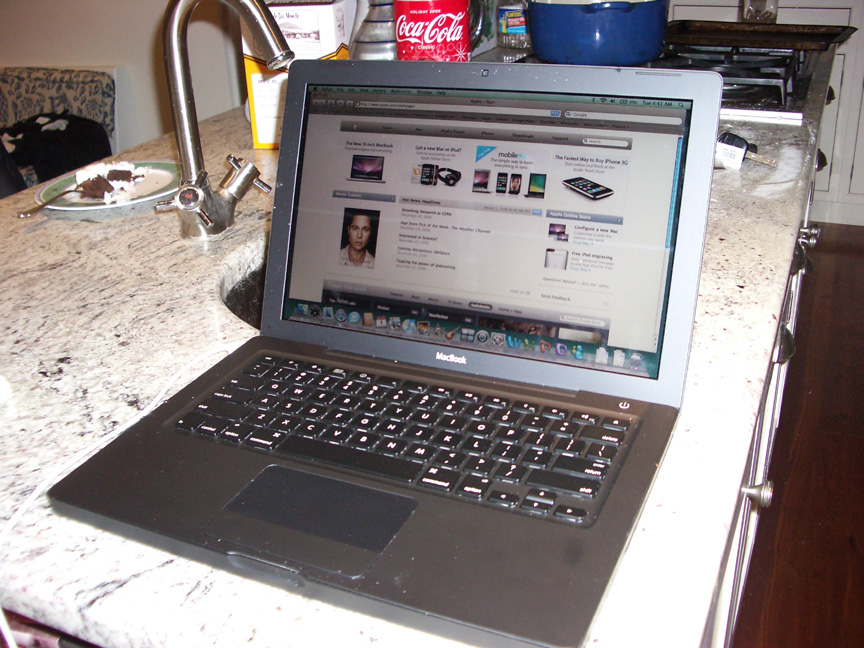
Carefully we re-assembled the Macbook, set it on the granite counter (in case of a fire), and "fired it up". Shockingly it worked! We were very (very) surprised and immediately shut down the Macbook in order to complete the clean-up. (Click for a larger image)

The keyboard was still pretty messed up --- keys sticking, very strong smell of wine. So we took the laptop apart again and carefully washed the top case/keyboard in the kitchen sink (yes, the kitchen sink, with the hand spayer and hot water) and took it outside to thoroughly shake the excess water out. The logic was: It's really only a free Macbook if the repairs are free. A new keyboard/top case costs about $130 to $150. Water from the kitchen sink is virtually free. Why not give it a try ... and so we did with great success.
The keyboard was then dried it in the oven at 150° for about 10 minutes. (Click for a larger image)

Re-assembled the Macbook again and Viola! It worked!
Downloaded a year's worth of various patches, changed a bunch of admin settings. Browsed the Internet. By this time it was 3:30 AM. Time for bed.
All that remained was a problem with the CD/DVD optical drive.
So the next day we repeated our previous operation and took the Macbook apart for the third time. We again carefully followed the helpful online instructions on the PC and removed the optical drive.and found extensive deposits of dried wine all through it. Not good.
This required some more detailed dis-assembling. Carefully we took the entire optical drive apart, screw by screw ... voiding the warranty as the helpful sticker told us. Cleaned it very, very carefully, but were unsuccessful getting the optical drive to work properly. This was likely due to excessively enthusiastic cleaning and even a little WD40 lubricant. Should have left well enough alone.

Here's another view of the optical drive removed.

We were not the first to attempt this level of repair. Here's a tale of a more successful job than ours, perhaps performed by an expert!
So the saga of the Macbook repair continues. We've ordered a new Superdrive from ifixit.com and we'll report the progress here in the next few days.
Not quite "free", but we have a great (mostly) working Macbook and, so far, a priceless learning experience.
Investment to date:
* Two set of tools
* Mac OS X Leopard Guide
* A new Superdrive from iFixIt
* About 14 hours of labor
* A wee bit of Irish Poteen
Steve MacLellan
Lincoln, Massachusetts

The Macbook ... working!
In December 2008, we were offered a badly damaged Macbook 13" from a friend that had
experienced an unusually short life (not the friend, the laptop). Less than one week actually. We jumped at the
chance to get a great Macbook essentially for free --- well almost, as you will soon see.
This particular Macbook was DOA due to excessive drinking ... apparently an entire glass of very fine red wine
was spilled on the keyboard. This vintage of Cabernet softly flowed through the keyboard and was drained out via
the optical drive, normally reserved for reading CD's and DVD's. You could only imagine the horror of such an event.
On any old PC, no issue. Just replace the keyboard and back to work. But not for this Macbook.

The essential ingredients for our Macbook repair: useful guides, precision, tools
... and Poteen!
The machine in question was taken the next day to the local Apple retail store. The Apple Geniuses refused to have
anything to do with this fine piece of 21st Century technology. Apparently liquid spills were outside the realm
of Genius Territory and immediately voided the Apple warranty. Our horrified and heartbroken friend sighed, bought
another Macbook just as great as the first one, and placed the smelly, damaged one on the basement shelf for almost
year before it found a new home at the MacLellan's in Lincoln.
As we say, no job is too dirty or difficult for Steve (the Dad), Stephen, and Alex (the sons). So the saga began.
The Repair Journey started with reading multiple guides and web pages on repairing Mac's. The best ones can be
found at: